
brix:en:partners:new
Entering a new partner
Brix keeps a shared register with basic data on a large number of businesses in the background, so a new partner is usually not entered manually but taken from that register. The procedure is the same in the Partners form and when entering a partner from a partner field on a document, e.g. {Customer} on an invoice.
- First look for the partner by entering part of the OIB or keywords from the name; the order of entry does not matter. Brix searches the company's partners.

- If the partner is not found, entry of a new partner is started with the
 icon — at the bottom of the partner list or next to the partner field on the document.
 - The [ Partner - Add ] dialog is shown with the {Find Entity} field, where the OIB (preferably) or part of the entity's name has to be entered again. Brix now searches the shared register and shows the list of entities it knows; the more data is entered, the shorter the list.
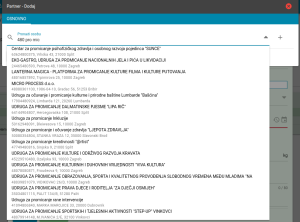
- If Brix shows the matching entity, select it from the list and, if necessary, correct or complete the partner data brought in.
- If Brix does not show the matching business in the list, the icon to the right of the {Find Entity} field opens the form for entering all partner data. First the partner type is marked: {Individual}, {Business} or {Temporary}.
- For a domestic business, enter the {OIB} first. On leaving that field, Brix tries to find the matching business in external sources (e.g. the Court Register) and, if it finds the data, shows it. Correct or complete the data shown.
- If Brix does not find data in external sources, all partner data has to be entered manually: select the {Country}, then enter the remaining data.
- For an individual and a temporary partner the data is always entered manually.
- The data is saved with the SAVE button. This also enters the business into the shared register of businesses.


Brix has no shared register of individuals; each company enters and keeps its own records of individuals.
Rules for entering partners
Since all Brix users share the same basic data of businesses from the shared register, the following rules must be observed.
brix/en/partners/new.txt · Zadnja izmjena: od Zoran Spoja